|
VCLib Documentation
6.12.2
|
 |
|
VCLib Documentation
6.12.2
|
|
Functions | |
| I32 | init_color_table (U32 red, U32 green, U32 blue, U8 table[]) |
| Initialize Color Software Lookup-Table. More... | |
| I32 | WhiteBalanceValues (image *bayer, I32 *red, I32 *green, I32 *blue) |
| Calculate White Balance Values. More... | |
| I32 | RGB_YCbCr411 (image *rgb, image *ycbcr) |
| RGB to YCbCr 4:1:1 Color Conversion. More... | |
| I32 | RGB_YCbCr422 (image *rgb, image *ycbcr) |
| RGB to YCbCr 4:2:2 Color Conversion. More... | |
| I32 | RGB_IHS (image *rgb, image *ihs) |
| RGB to IHS (HSI) Color Conversion. More... | |
| I32 | YCbCr_RGB (image *ycbcr, image *rgb) |
| YCbCr to RGB Color Conversion. More... | |
| I32 | YCbCr_RGB411 (image *ycbcr, image *rgb) |
| YCbCr 4:1:1 to RGB Color Conversion. More... | |
| I32 | YCbCr_RGB422 (image *ycbcr, image *rgb) |
| YCbCr 4:2:2 to RGB Color Conversion. More... | |
| I32 | YCbCr_NORM (image *ycbcr, image *yuvnrm) |
| YCbCr to Normalized YCbCr Color Conversion. More... | |
| I32 | NORM_YCbCr (image *yuvnrm, image *ycbcr) |
| Normalized YCbCr to YCbCr Color Conversion. More... | |
| I32 | clut_bayer (image *bayer1, image *bayer2, U8 table[]) |
| Bayer Color Lookup Table Operation. More... | |
| I32 | BayerToRGB_5x5 (image *bayer, image *rgb, image *ovl, void *(*function)()) |
| Convert Color Image from IMAGE_BAYER to other color image formats. More... | |
| I32 | hue_histo (U32 hist[], U32 hue[], U32 sat[]) |
| convert two-dimensional color histogram into 1D hue histogram. More... | |
| I32 | hue_histo_init (I32 u0, I32 v0) |
| initialize tables for function hue_histo(). More... | |
| void | hue_histo_deinit () |
| deinitialize tables for function hue_histo(). More... | |
| I32 | color_histo (image *img, U32 hist[]) |
| Color Histogram of a Color Image Variable. More... | |
| I32 | color_classify (image *src, image *dst, U8 table[]) |
| Color Classification. More... | |
| I32 | color_sector (U8 *table, I32 hue, I32 tol, I32 minsat, I32 maxsat, I32 value) |
| set selection table for color classification. More... | |
| I32 | display_chisto (image *map, U32 hist[]) |
| Display Color Histogram. More... | |
| #define | BayerToGrey(bayer, grey) BayerToRGB_5x5(bayer, grey, NULL, (void *(*)())StoreGrey) |
| Convert Bayer Image To Grey Image (Macro). More... | |
| I32 | RGB_YCbCr (image *rgb, image *ycbcr) |
| RGB to YCbCr Color Conversion. More... | |
Functions in this group perform the processing and evaluation of color images in the various color image formats.
| #define BayerToGrey | ( | bayer, | |
| grey | |||
| ) | BayerToRGB_5x5(bayer, grey, NULL, (void *(*)())StoreGrey) |
The macro converts a bayer image to grey value image. The following simple formula is applied to convert rgb-values to grey:
grey = r + 2*g + b
This means that the resulting grey value is not absolutely physiologically correct. For Machine Vision, however, it is a good choice.
BayerToGrey() is a macro which calls BayerToRGB_5x5() with basic function StoreGrey() as an argument.
This function programs a software color lookup-table to a linear mapping between input and output. The mappings for the red, green and blue channels can be programmed to a different slope, which is a useful feature for adjusting the whitebalance of the camera. Slope values for red, green and blue can be used to amplify each channel (value > 1024) or attenuate the channel (value < 1024). A value of 1024 will result in an identity transform. 8 bits are used for the input of the LUT, 8 bits for the output. This function may be used for whitebalance adjustment for all cameras without hardware input LUT. For the whitebalance adjustment, we recommend to leave the channel with the maximum intensity at the identity transform, the other two channels should be amplified by appropriate factors. The possible range for red, greeen and blue is [0.. 32768] equivalent to amplification factors between 0 and 32. side effects The function changes the values of the system variables RED, GREEN and BLUE.
The start address of 'bayer' must be a red pixel, like:
| R | G | R | G | R | G |
| G | B | G | B | G | B |
| R | G | R | G | R | G |
| G | B | G | B | G | B |
| R | G | R | G | R | G |
| G | B | G | B | G | B |
| table | The Lookup Table. |
| red,green,blue | Multiplication Factors for Red/Green/Blue Channel. |
This function performs the calculation of the white balance values for red, green and blue. bayer must be an image variable of type IMAGE_BAYER. red, green and blue are pointers for the storage of the white balance correction values calculated by the function. bayer->st must point to a red pixel:
| R | G | R | G | R | G |
| G | B | G | B | G | B |
| R | G | R | G | R | G |
| G | B | G | B | G | B |
| R | G | R | G | R | G |
| G | B | G | B | G | B |
The return value of the function is the maximum of the average intensities for the red, green and blue pixels. Before the function is executed, the hardware input lookup-table (not available for all camera models) must be set to equal amplification for the 3 channels, for example with the statement: init_color_lut(1024, 1024, 1024); A white or grey reference image must be presented to the camera for the pixels specified by the image variable bayer . The result of this function is only reliable, if the pixel intensity is within a specific range. For this reason, the function outputs the maximum average red/green/blue intensities. This value should be in the range of [100..180]. If the value is less than 100, the image might be too noisy and the resolution will suffer. If the value is higher than 180, some of the pixel might be saturated, which will result in an incorrect white balance.
The brightest color will be assigned a value of 1024. The other colors will get higher values. For example: red=1550, green=1024, blue=1400.
Don't forget to initialise the LUT table with the standard values of 1024 for every color, otherwise you'll get a wrong white balance !
| bayer | source image variable |
| red,green,blue | pointers to result values for the 3 channels |
This function converts RGB images to YCbCr images using the following formula:
rgb specifies the image variable for the input RGB image, ycbcr for the resulting YCbCr output image. All results are rounded properly using 4/5 rounding.
The image variable rgb must be of type IMAGE_RGB, ycbcr must be of type IMAGE_CBCR444. The function may be called in-place, i.e. with the same image variable pointer for rgb and ycbcr. In this case, the image variable must be of type IMAGE_CBCR444.
This function converts RGB images to YCbCr images using the following formula:
rgb specifies the image variable for the input RGB image, ycbcr for the resulting YCbCr output image. All results are rounded properly using 4/5 rounding.
The image variable rgb must be of type IMAGE_RGB, ycbcr must be of type IMAGE_CBCR411. The function may be called in-place, i.e. with the same image variable pointer for rgb and ycbcr. In this case, the image variable must be of type IMAGE_RGB.
This function converts RGB images to YCbCr images using the following formula:
rgb specifies the image variable for the input RGB image, ycbcr for the resulting YCbCr output image. All results are rounded properly using 4/5 rounding.
The image variable rgb must be of type IMAGE_RGB, ycbcr must be of type IMAGE_CBCR422. The function may be called in-place, i.e. with the same image variable pointer for rgb and ycbcr. In this case, the image variable must be of type IMAGE_RGB.
This function converts RGB images to IHS using the following formula:
Define
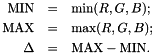
Then:
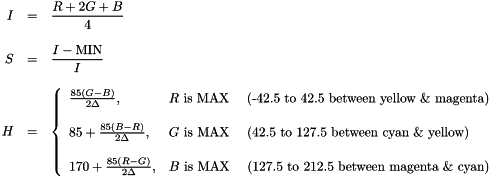
rgb specifies the image variable for the input RGB image, ihs for the resulting IHS output image. The image variable ihs must be of type IMAGE_IHS, rgb must be of type IMAGE_RGB. The function may be called in-place, i.e. with the same image variable pointer for ihs and rgb. In this case, the image variable must be of type IMAGE_IHS.
This function converts YCbCr images to RGB images using the following formula:
ycbcr specifies the image variable for the input YCbCr image, rgb for the resulting RGB output image. All results are rounded properly using 4/5 rounding.
The image variable ycbcr must be of type IMAGE_CBCR444, rgb must be of type IMAGE_RGB. The function may be called in-place, i.e. with the same image variable pointer for ycbcr and rgb. In this case, the image variable must be of type IMAGE_RGB.
This function converts YCbCr images to RGB images using the following formula:
ycbcr specifies the image variable for the input YCbCr image, rgb for the resulting RGB output image. All results are rounded properly using 4/5 rounding.
The image variable ycbcr must be of type IMAGE_CBCR411, rgb must be of type IMAGE_RGB. The function may be called in-place, i.e. with the same image variable pointer for ycbcr and rgb. In this case, the image variable must be of type IMAGE_RGB.
This function converts YCbCr images to RGB images using the following formula:
ycbcr specifies the image variable for the input YCbCr image, rgb for the resulting RGB output image. All results are rounded properly using 4/5 rounding.
The image variable ycbcr must be of type IMAGE_CBCR422, rgb must be of type IMAGE_RGB. The function may be called in-place, i.e. with the same image variable pointer for ycbcr and rgb. In this case, the image variable must be of type IMAGE_RGB.
This function converts YCbCr images to normalized YCbCr images using the following formula:
with:
The function operates on the color components only, i.e. it leaves the Y component unchanged. ycbcr specifies the image variable for the input YCbCr image, ynbnr for the resulting normalized YCbCr output image. All results are rounded properly using 4/5 rounding.
The image variable ycbcr must be of type IMAGE_CBCR444, ynbnr must be of type IMAGE_YUVNORM. The function may be called in-place, i.e. with the same image variable pointer for ycbcr and ynbnr. In this case, the image variable must be of type IMAGE_YUVNORM.
This function converts normalized YCbCr images to YCbCr images using the following formula:
with:
The function operates on the color components only, i.e. it leaves the Y component unchanged. ynbnr specifies the image variable for the input normalized YCbCr image, ycbcr for the resulting YCbCr output image. All results are rounded properly using 4/5 rounding. The image variable ycbcr must be of type IMAGE_CBCR444, ynbnr must be of type IMAGE_YUVNORM. The function may be called in-place, i.e. with the same image variable pointer for ycbcr and ynbnr. In this case, the image variable must be of type IMAGE_CBCR444.
This function performs a bayer color lookuptable operation for all cameras without hardware input LUT. bayer1 is the image variable for the source image, bayer2 for the destination image. Both images must be of type = IMAGE_BAYER. The image variable bayer1 should start with a red pixel. table[1024] is the lookup-table which contains the mapping of the input pixels to the output pixels. table[] consists of 4 independent LUTs with 256 values each for R1, G1, G2 and B2 in this sequence. The following diagram visualizes the bayer pattern of the sensor. Please note, that there are two green pixels (named G1 and G2) which are treated seperately by the function.
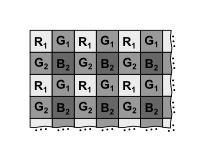
The output of this function is a bayer pattern with the same organization as the input image with an individual mapping of red, green and blue pixels. table may be the a linear mapping table calculated with init_color_table(), e.g. for a whitebalance operation.
| bayer1 | Source image |
| bayer2 | Destination image |
| table | The LUT with independent values for RGGB |
| ERR_TYPE | if Either Image bayer1 or bayer2 is not of Type IMAGE_BAYER. |
| ERR_NONE | on Success. |
The function converts Bayer pattern images (type = IMAGE_BAYER) to other color image formats (e.g type = IMAGE_GREY, IMAGE_RGB, etc.). The function is called with a function pointer specifying the conversion to the required image format.
The routine uses a 5x5 filter mask which results in maximum resolution for the resulting grey value image and minimal color artifacts.
| result image | Call | Basic function |
|---|---|---|
| IMAGE_GREY | BayerToGrey(bayer, grey) | StoreGrey() |
| IMAGE_GREY | BayerToGrey_Centred(bayer, grey) | StoreGrey_Centred() |
| IMAGE_RGB | BayerToRGB(bayer, rgb) | StoreRGB() |
| IMAGE_RGB | BayerToRGB_Centred(bayer, rgb) | StoreRGB_Centred() |
| IMAGE_CBCR444 | BayerToYCbCr(bayer, ycbcr) | StoreYCBCR444() |
| IMAGE_CBCR411 | BayerToYCbCr411(bayer, ycbcr) | StoreYCBCR411() |
| IMAGE_CBCR422 | BayerToYCbCr422(bayer, ycbcr) | StoreYCBCR422() |
| IMAGE_RGBO | BAYER_RGBO(bayer, ovl, rgbo) | StoreRGBO() |
| IMAGE_RGBO | BAYER_GREY_RGBO(bayer, ovl, rgbo) | StoreGreyRGBO() |
macro BayerToGrey(): The following simple formula is applied to convert rgb-values to grey:
y = r + 2*g + b
This means that the resulting grey value is not absolutely physiologically correct. For Machine Vision, however, it is a good choice.
macros BayerToYCbCr(), BayerToYCbCr411(), BayerToYCbCr422(): We strongly recommend using these functions instead of using BayerToRGB() since the YcbCr format is compatible with most of the VCLIB functions for grey value images (Y = grey image is stored as the first component in memory). The format IMAGE_CBCR422 is required for the color JPEG conversion.
The function returns the standard error code.
| Bayer | Source image, must be type=IMAGE_BAYER. |
| RGB | Destination image, type depending on basic function. |
| ovl | Overlay image, only required for IMAGE_RGBO output. |
| function | Color conversion Basic Function Pointer (Performs the Actual Operation). |
The function hue_histo() converts the two-dimensional color histogram array produced with function color_histo() into a 1D hue and saturation histogram.
The function works with the following arrays:
   U32 hist [65536]    the 2D color histogram (input to the function)
   U32 hue  [512]      the 1D hue histogram (output)
   U32 sat  [512]      the average saturation (output)
The function scans the color histogram hist[] and calculates the hue (angle) as well as the saturation (distance from the color histogram center at (128, 128)). The function works with 512 hue and saturation bins.
After execution, the array hue[h] contains the number of pixels in the color bin h. sat[h] contains (number of pixels) * (distance from center).
Thus, dividing (float)sat[h]/(float)hue[h] will result in some kind of average saturation for that particular bin h.
The function requires the initialization of 2 tables which are held in memory until no longer needed. The initialization is controlled with I32 hue_histo_init(I32 u0, I32 v0) and void hue_histo_deinit(), where u0 and v0 are the coordinates of the histogram center.
| channel | YCbCr | Normalized YCbCr |
|---|---|---|
| u0 | 128 | 29 |
| v0 | 128 | 26 |
example:
hue_histo_init(128, 128); // allocate and initialize // tables
hist = (U32 *)vcmalloc(65536); hue = (U32 *)vcmalloc(512); sat = (U32 *)vcmalloc(512);
BayerToYCbCr(&img, &ycbcr); // convert image to YCbCr
ycbcr.dx -= 4; // correct image for ycbcr.dy -= 4; // border of 5x5 operator
color_histo(&ycbcr, hist); // full 2D color histogram
ycbcr.dx += 4; // restore to original ycbcr.dy += 4; // size
hue_histo(hist, hue, sat); // convert color histogram // into hue histogram FL_MAX_U32P(512, hue, &mx); // find maximum: mx
vcfree (sat); // release memory vcfree (hue); vcfree (hist);
hue_histo_deinit(); // deallocate tables
Typical hue values for YCbCr-space:
| hue value | color |
|---|---|
| 66 | blue |
| 297 | red |
| 372 | yellow |
| 439 | green |
The function returns the standard error code.
| hist | [65536] the 2D color histogram (input to the function) |
| hue | [512] the 1D hue histogram (output) |
| sat | [512] the average saturation (output) |
The function initializes 2 tables for the use by function hue_histo(). The tables must be initialized, otherwise function hue_histo() will return with an error. If the tables are no longer needed, function hue_histo_deinit() should be called.
u0 and v0 are the coordinates of the histogram center.
| channel | YCbCr | Normalized YCbCr |
|---|---|---|
| u0 | 128 | 29 |
| v0 | 128 | 26 |
The function returns the standard error code.
| u0 | center for u values, e.g. 128 |
| v0 | center for v values, e.g. 128 |
| void hue_histo_deinit | ( | ) |
The function frees the 2 tables allocated by function hue_histo_init().
The function calculates the color histogram hist of the color image variable img. Supported image types are IMAGE_CBCR444, IMAGE_YUVNORM and IMAGE_IHS. The color histogram is calculated for the color components of the image only. I.e. the luminance signal for YCbCr and YUVnorm and the Intensity for the HIS color model are not considered for the calculation. The histogram is the absolute frequency of the 65536 different colors (different hue, different saturation) in an image/image window. In addition to the color image variable img, a pointer to the histogram array with 65536 values is passed to the function. After calling the function, the result can be taken from this array. Since hist[] is a two-dimensional array of 256×256 values, it is important to know, how to address it properly:
So, the u-component (Cb, H) is stored as first index, the v-component (Cr, S) as second index.
The function performs a color classification of a color image variable. The following types are allowed for the source image variable src: IMAGE_CBCR444, IMAGE_YUVNORM and IMAGE_IHS. The function works on the color components (Cb, Cr / H, S) of the image variable only. The luminance (Y / I) is not considered for this operation For each individual pixel, the color components act as a two-dimensional index to the classification array table[] and the table value is output for the destination image dst. dst must be an image of type IMAGE_GREY table[] is an array with 256×256=65536 values.
Example: Assume that we have a color image of type IMAGE_CBCR444. Assume further that we want to select all exactly colorless pixels, i.e. Cb=Cr=0. Since Cr and Cb are stored with offset 128, set table[128][128] = 1 and table[u][v] = 0 for u,v ≠ 128. The destination image will have value 1 for all absolutely colorless pixels with Cb=128, Cr=128. All other pixels will have value 0.
color_sector() sets the values of the classification table for the function color_classify(). The size of the table must be 256x256. A sector of this table is set to value by the function, all other values are set to 0. The angle of the sector is defined by hue, its with is +/-tol. minsat defines the minimum distance from the origin (saturation), maxsat the maximum distance (saturation).
Like the function hue_histo(), the initialization of two tables is required. The tables are held in memory until no longer needed. The initialization is controlled with
I32 hue_histo_init(I32 u0, I32 v0) and void hue_histo_deinit() where u0 and v0 are the coordinates of the color center
| channel | YCbCr | Normalized YCbCr |
|---|---|---|
| u0 | 128 | 29 |
| v0 | 128 | 26 |
table[] is an array with 256x256=65536 values.
The function generates a two-dimensional plot of the hist array. The image described by the image variable map must have at least 256×256 pixels since the plot will produce exactly 256×256 pixels. The type of the image variable map may be IMAGE_GREY, IMAGE_RGB or IMAGE_CBCR444. The function displays the the first component of the histogram (Cb, u, H) in the horizontal direction, the second components (Cr, v, S) is displayed vertically. If the result image map is a color image type, the display is done with the color of the corresponding original image color, but with a constant saturation.